Three Major Microsoft Changes Coming In 2026
•
By slashdotcom
•
5 min read
•
252 views
Microsoft is rolling out three major changes that will impact every organisation in 2025–2026: mandatory MFA for admin accounts, the retirement of the legacy Remote Desktop client, and a global Microsoft 365 price increase effective 1 July 2026. Here’s what’s changing, the exact dates, who it affects, and how Slashdotcom can help you prepare.
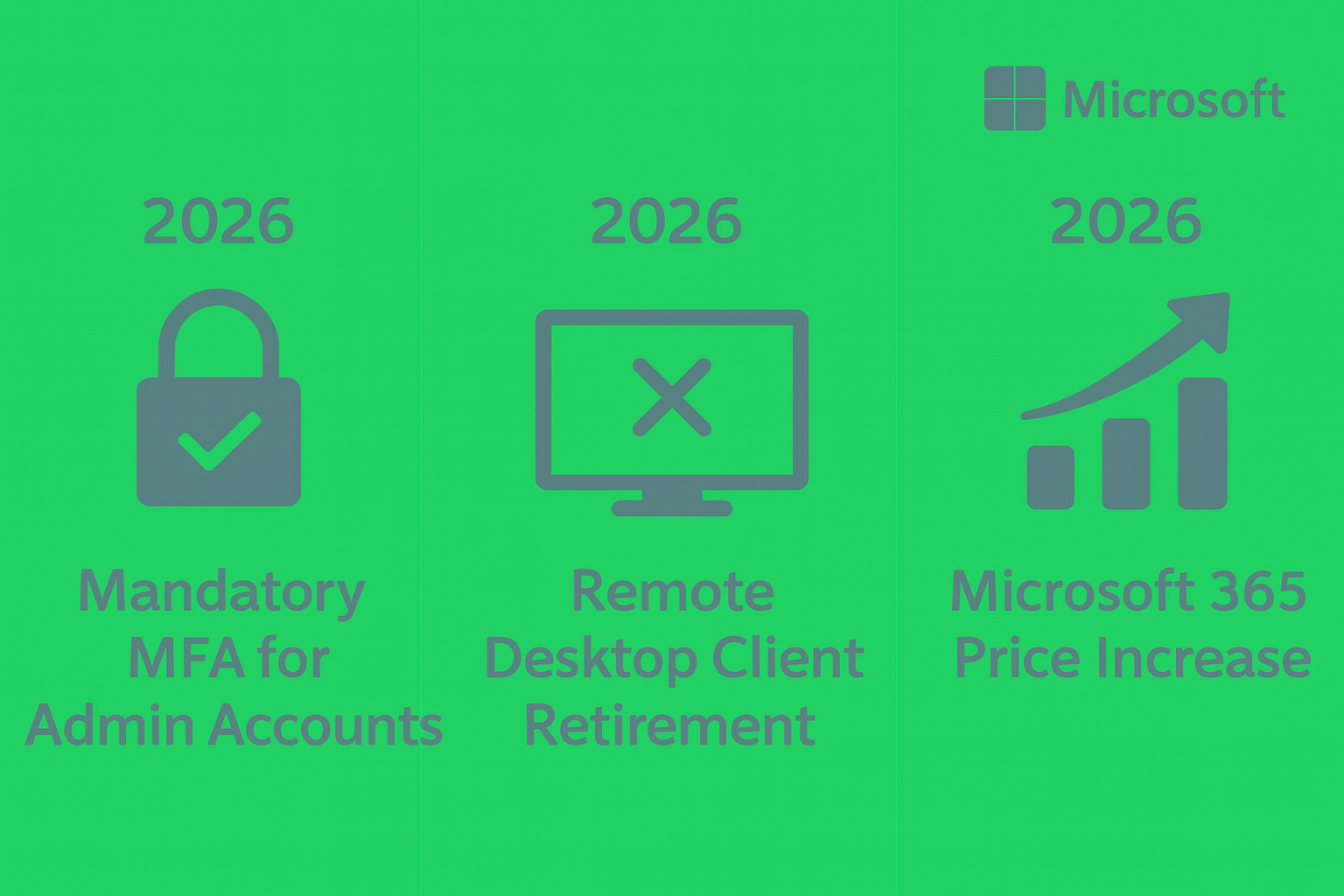
Three Major Microsoft Changes You Need to Prepare For in 2026
Microsoft is entering a new phase of security, cloud modernisation, and AI‑driven productivity — and with that comes several major changes that will affect every organisation. Whether you’re a small business or a large enterprise, these updates will influence your security posture, remote access strategy, and licensing costs.
Below, we break down the three biggest Microsoft changes, the exact dates, who they affect, and what you need to do now to stay ahead.
Below, we break down the three biggest Microsoft changes, the exact dates, who they affect, and what you need to do now to stay ahead.
1. Mandatory MFA for All Microsoft Admin Accounts
What’s happening
Microsoft is enforcing mandatory Multi‑Factor Authentication (MFA) for all administrator‑level accounts across Microsoft 365 and Azure. This is part of Microsoft’s Secure Future Initiative, designed to reduce identity‑based attacks — still the leading cause of breaches worldwide.
Exact dates
July 2024: MFA became mandatory for all new Microsoft 365 tenants.
October 2025: Microsoft begins tenant‑wide enforcement for existing organisations.
By March 2026: All tenants must comply — no admin accounts will be allowed without MFA.
Who it affects
Global Admins
Privileged Role Admins
Exchange, SharePoint, Teams, Intune, and Security Admins
Break‑glass accounts
Any account with elevated permissions
What you need to do
Enable MFA for every admin account immediately.
Replace SMS MFA with Microsoft Authenticator or FIDO2 security keys.
Audit your tenant for unused or legacy admin roles.
Implement Privileged Identity Management (PIM) to eliminate standing admin access.
Microsoft is enforcing mandatory Multi‑Factor Authentication (MFA) for all administrator‑level accounts across Microsoft 365 and Azure. This is part of Microsoft’s Secure Future Initiative, designed to reduce identity‑based attacks — still the leading cause of breaches worldwide.
Exact dates
July 2024: MFA became mandatory for all new Microsoft 365 tenants.
October 2025: Microsoft begins tenant‑wide enforcement for existing organisations.
By March 2026: All tenants must comply — no admin accounts will be allowed without MFA.
Who it affects
Global Admins
Privileged Role Admins
Exchange, SharePoint, Teams, Intune, and Security Admins
Break‑glass accounts
Any account with elevated permissions
What you need to do
Enable MFA for every admin account immediately.
Replace SMS MFA with Microsoft Authenticator or FIDO2 security keys.
Audit your tenant for unused or legacy admin roles.
Implement Privileged Identity Management (PIM) to eliminate standing admin access.
2. Microsoft Remote Desktop Client (mstsc.exe) Retirement
What’s happening
Microsoft is retiring the legacy Remote Desktop Connection (mstsc.exe) client and shifting users to the modern Windows App and Azure Virtual Desktop (AVD) experience. This aligns with Microsoft’s move away from legacy protocols and toward identity‑secured, cloud‑managed remote access.
Exact dates
September 2024: Deprecation roadmap announced.
January 2025: Feature development for mstsc.exe officially ended.
June 2026: Expected retirement from supported Windows builds.
Late 2026: Security updates for mstsc.exe expected to end.
Who it affects
Organisations using on‑prem RDS
Businesses relying on mstsc.exe for remote access
Any environment dependent on legacy Remote Desktop infrastructure
What you need to do
Begin planning a migration to Azure Virtual Desktop, Windows 365, or a modern remote access solution.
Review firewall, identity, and conditional access policies.
Update user training and documentation for the new Windows App.
Microsoft is retiring the legacy Remote Desktop Connection (mstsc.exe) client and shifting users to the modern Windows App and Azure Virtual Desktop (AVD) experience. This aligns with Microsoft’s move away from legacy protocols and toward identity‑secured, cloud‑managed remote access.
Exact dates
September 2024: Deprecation roadmap announced.
January 2025: Feature development for mstsc.exe officially ended.
June 2026: Expected retirement from supported Windows builds.
Late 2026: Security updates for mstsc.exe expected to end.
Who it affects
Organisations using on‑prem RDS
Businesses relying on mstsc.exe for remote access
Any environment dependent on legacy Remote Desktop infrastructure
What you need to do
Begin planning a migration to Azure Virtual Desktop, Windows 365, or a modern remote access solution.
Review firewall, identity, and conditional access policies.
Update user training and documentation for the new Windows App.
3. Microsoft 365 Global Price Increase — Effective 1 July 2026
What’s happening
Microsoft is introducing a global price increase across Microsoft 365 commercial plans. This reflects the addition of over 1,100 new features, major AI enhancements, and expanded security capabilities.
Exact date
1 July 2026 — price increase takes effect globally.
Who it affects
All commercial Microsoft 365 customers
CSP, NCE, and Enterprise Agreement customers
Charities and education customers may see different uplift structures
Microsoft is introducing a global price increase across Microsoft 365 commercial plans. This reflects the addition of over 1,100 new features, major AI enhancements, and expanded security capabilities.
Exact date
1 July 2026 — price increase takes effect globally.
Who it affects
All commercial Microsoft 365 customers
CSP, NCE, and Enterprise Agreement customers
Charities and education customers may see different uplift structures
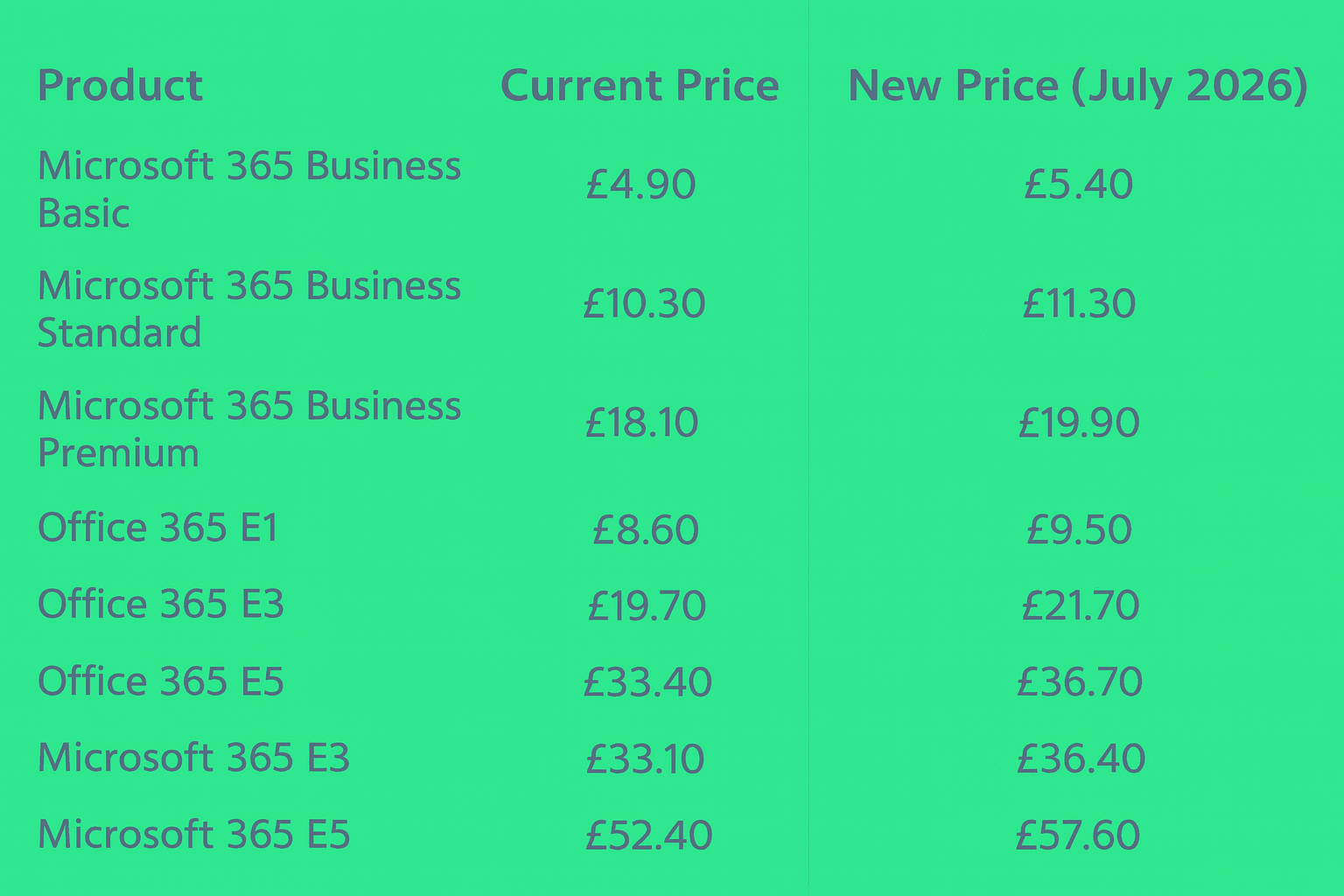
How to Delay or Reduce the 2026 Price Increase
Can you keep the old price by locking in early?
Yes — if your organisation renews its Microsoft 365 licences on an annual NCE commitment before 1 July 2026, you will keep the current pricing for the full duration of that term.
Examples:
Renew on 30 June 2026 → keep old pricing until 30 June 2027
Renew on 1 July 2026 → new pricing applies immediately
Important considerations
Month‑to‑month subscriptions will increase immediately on 1 July 2026.
Any new licences added after 1 July 2026 will be charged at the new, higher price — even if your existing licences are locked in.
Renewals after your term ends will renew at the new price.
Planning to Grow? Buy Ahead.
If your organisation expects to expand, hire, or increase headcount over the next 12 months — and you don’t anticipate reducing seats — it may be financially beneficial to purchase additional licences before 1 July 2026.
This allows you to:
Lock in the lower price for those extra seats
Avoid paying the 10% uplift on future hires
Stabilise your IT budget for the next year
This strategy is especially valuable for:
Growing SMEs
Seasonal businesses
Organisations with planned recruitment
Companies onboarding new teams or departments
If your organisation is planning to grow and you don’t expect to reduce seat numbers, it may be worth purchasing additional licences before 1 July 2026. This locks in the lower price for the full term and protects your budget from the upcoming 10% increase.
Yes — if your organisation renews its Microsoft 365 licences on an annual NCE commitment before 1 July 2026, you will keep the current pricing for the full duration of that term.
Examples:
Renew on 30 June 2026 → keep old pricing until 30 June 2027
Renew on 1 July 2026 → new pricing applies immediately
Important considerations
Month‑to‑month subscriptions will increase immediately on 1 July 2026.
Any new licences added after 1 July 2026 will be charged at the new, higher price — even if your existing licences are locked in.
Renewals after your term ends will renew at the new price.
Planning to Grow? Buy Ahead.
If your organisation expects to expand, hire, or increase headcount over the next 12 months — and you don’t anticipate reducing seats — it may be financially beneficial to purchase additional licences before 1 July 2026.
This allows you to:
Lock in the lower price for those extra seats
Avoid paying the 10% uplift on future hires
Stabilise your IT budget for the next year
This strategy is especially valuable for:
Growing SMEs
Seasonal businesses
Organisations with planned recruitment
Companies onboarding new teams or departments
If your organisation is planning to grow and you don’t expect to reduce seat numbers, it may be worth purchasing additional licences before 1 July 2026. This locks in the lower price for the full term and protects your budget from the upcoming 10% increase.
How slashdotcom Can Help
These changes aren’t just technical, they affect security, operations, budgeting, and long‑term strategy. slashdotcom is built for exactly this kind of transition.
✔ Security Hardening & MFA Enforcement
We audit your admin roles, implement MFA correctly, deploy FIDO2 keys, and ensure your tenant meets Microsoft’s new security baseline.
✔ Remote Access Modernisation
We help you move away from legacy RDS and mstsc.exe, designing a modern, secure, cloud‑ready remote access solution using AVD or Windows 365.
✔ Licensing Optimisation Ahead of the Price Rise
We analyse your entire Microsoft 365 estate, remove waste, right‑size licences, and lock in the best possible pricing before July 2026 — including strategies to pre‑purchase seats if you’re planning to grow.
✔ Strategic Guidance, Not Just IT Support
slashdotcom isn’t an MSP, we're a solution provider, we’re an operational partner.
We help you plan, budget, and execute changes with experience, clarity, and zero disruption.
✔ Security Hardening & MFA Enforcement
We audit your admin roles, implement MFA correctly, deploy FIDO2 keys, and ensure your tenant meets Microsoft’s new security baseline.
✔ Remote Access Modernisation
We help you move away from legacy RDS and mstsc.exe, designing a modern, secure, cloud‑ready remote access solution using AVD or Windows 365.
✔ Licensing Optimisation Ahead of the Price Rise
We analyse your entire Microsoft 365 estate, remove waste, right‑size licences, and lock in the best possible pricing before July 2026 — including strategies to pre‑purchase seats if you’re planning to grow.
✔ Strategic Guidance, Not Just IT Support
slashdotcom isn’t an MSP, we're a solution provider, we’re an operational partner.
We help you plan, budget, and execute changes with experience, clarity, and zero disruption.
Final Thoughts
Microsoft’s roadmap for 2026 is clear:
more security, more cloud, more AI — and higher costs for organisations that don’t prepare.
By acting early, you can stay compliant, avoid disruption, and make sure your licensing and infrastructure are ready for the future.
Get in touch: hello@slashdotcom.co.uk
more security, more cloud, more AI — and higher costs for organisations that don’t prepare.
By acting early, you can stay compliant, avoid disruption, and make sure your licensing and infrastructure are ready for the future.
Get in touch: hello@slashdotcom.co.uk